The Options button opens the Options window where you can select which features you want to see in action. You can access the Options Menu either through the Options button or by right clicking (Mac: Ctrl + click) on the Dial or background.
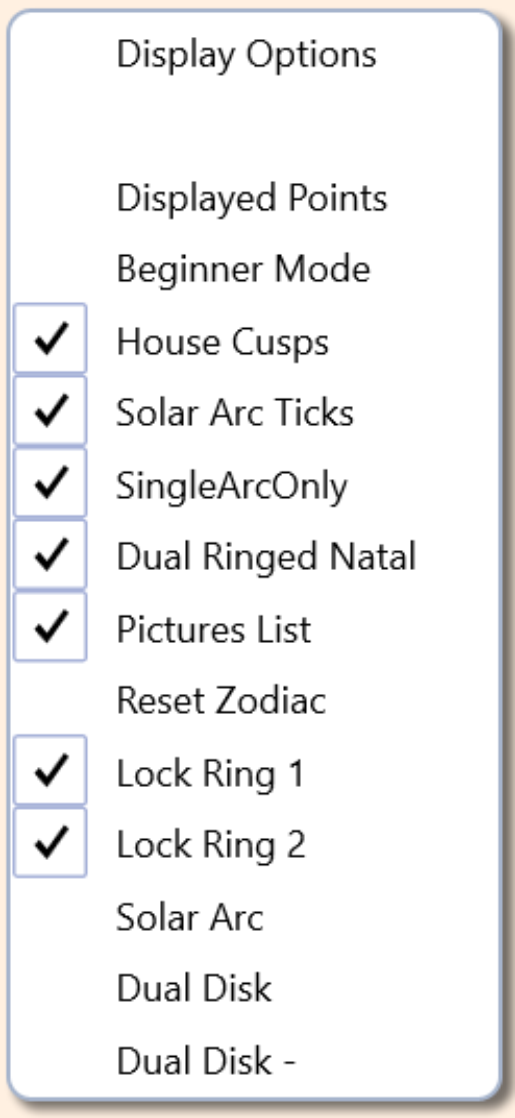
The Options Menu where you can select different conditions for display on the Dial.
Once you have brought up the Options menu, under the heading, Display Options is a blank line. When you select the blank line with a left click (or the Display Options header), the Options Menu disappears. This is how to clear this feature. With some of the features, a check mark will appear to the left of each item selected and will remain until you uncheck the item. Once you check or uncheck a feature, the Options Menu will disappear. If you click on any clear area on the Display Window, the Options Menu will disappear.
Below the Blank Line is Displayed Points. This is discussed fully in Displayed Points. Selecting Displayed Points brings up the Displayed Points Selection Menu where you can add or subtract planets and other factors for display on the Dial. No check mark will appear when you make this selection.
If you select Beginner Mode, the hard series of aspect symbols will appear on the Dial to assist in identifying various 8th harmonic information.
Below Beginner Mode is House Cusps. When you select this feature, the House Cusp lines will appear on the Dial. Unchecked the house cusps will not be displayed.
Checking the Solar Arc Ticks displays the various Solar Arc markings on the Dial. These markings use the Dial as a protractor to measure Arcs between various items on the Dial. The Solar Arc green lines are direct Solar Arcs. The Solar Arc red lines are inverse Solar Arcs. The shortest lines are ½ Solar Arc, while the longest are the 2x Solar Arc. The medium lines are the specific Solar Arcs. They are measured from the Dial Pointer and the point opposite on both the 360° and 90° dials. When you place the Dial Pointer on a planet (or other factor, formula or dynamics - anywhere) the Solar Arc Ticks will simultaneously show all the positions that are sensitive through Solar Arc to the planet you are focused on. Using the Dial as a measuring device is a powerful feature of working with Dials.
Below the Solar Arc Ticks selection is SingleArcOnly. This feature, when selected, turns off the ½ Solar Arc and 2x Solar Arc ticks, leaving only the direct and inverse Single Solar Arc ticks visible on the dial.
Below the Solar Arc Ticks selection is Dual Ringed Natal. This feature, when selected, turns on the ability to place two charts (usually a dynamic chart) on the same Ring. This feature is essential for Single Disk analysis. The added material is differentiated from the original chart by being smaller with shorter connecting lines. This allows the material to be mixed together for formulas and other Dial operations and, along with the Solar Arc Ticks, above, provide the basis of Single Disk Analysis. When you check this option and add another chart, the Dial will shrink to fit in the single ring. When you leave this feature unchecked, it puts the natal and dynamics on a separate ring and at the same size to do complex Planetary Pictures.
The Pictures List when checked, displays the Formula Window described in Settings Marquees, Formulas at the Pointer Position and the Interpretation Window. Sometimes, if your computer is doing too many things at once and is slowing down (or stuttering), you can uncheck this feature and the program will stop calculating all the possible Planetary Pictures and other Midpoints and the Formula Window will cease to display, possibly gaining some needed CPU energy. Or you may want to blank the Formula Window to reduce display clutter. This feature is defaulted to checked.
The Reset Zodiac returns multiple rings to their default position. If you are using the Rings for Dual-Disk Analysis and move them around and want them to line up back to when you have populated the Rings and before you have moved them, select this option and the Rings will return to the starting default positions. This differs from the use of the Home button. The Home button will return the display to the originally loaded chart while this setting returns the chart rings to their origin while they retain the chart material you have added.
Lock Ring 1 when checked (default) keeps whatever chart is displayed locked into the Zodiacal position relative to the Cardinal Axis. When unchecked, the entire Ring 1 (the Ring closest to the Dial Grid) becomes moveable like the dial itself. When Ring 1 and Ring 2 can move in relation to each other, one can take positions from one ring and place it on the other ring. Where other planets line up, they are connected with the 1st pair through completed Planetary Pictures. Using the Reset Zodiac setting, you can return the charts to their original relationship. See The Dynamic Button for more information about Rotating Rings 1 and 2.
Lock Ring 2 works similar to Lock Ring 1, except it applies to the 2nd ring and when unchecked allows the 2nd Ring to move like the Dial when you left click the mouse and drag the ring around. Lining up planets and factors between Ring 1 and Ring 2 illustrates things like due dates of dynamics, Solar Arc relationships in a horoscope and planetary combinations. This is the basis of Dual-Disk Analysis, which is the formal way of using the Dial by many Uranians.
Dual Disk creates the same chart as on Ring 1 to Ring 2. This allows either Ring to be moved to find combinations and relationships in a single chart. When you draw material onto the 2nd Ring using the dynamic controls you are comparing the dynamics against the natal. Here, you can find completed Planetary Pictures, sensitive arc openings and other combinations unique to the chart in question. The Home button returns the chart to its original state and shuts off the 2nd Ring.
Dual Disk – creates a 2nd Ring that inverts the original chart positions similar to antiscia, allowing you to find Combinations between the original chart and its antiscia placements. These placements all connect to the Cardinal Axis. The Home button reverts the chart to its original condition. Reset Zodiac resets the 2 rings to their original placement and should be resorted to when you dig too deep into these features and need to come back to your starting conditions.
